Microcontroller vs Microprocessor: Differences Explained
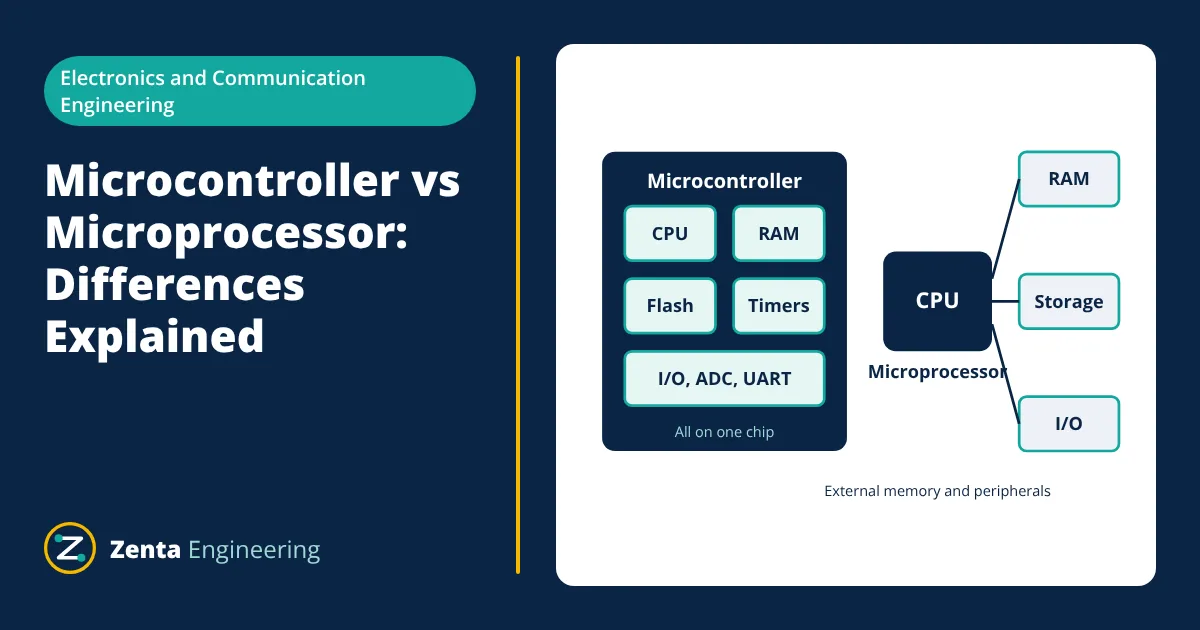
Microcontroller vs microprocessor comes down to how much is built into the chip.
A microcontroller (MCU) is a complete small computer on one chip: processor core, program memory, RAM and peripherals such as timers, ADCs and serial ports. It is built to control a specific device with low power and predictable timing.
A microprocessor (MPU) is mainly the processing core. It relies on external memory and support chips, runs at higher speed and usually runs a full operating system such as Linux or Windows.
What a microcontroller contains
A typical microcontroller integrates:
- a CPU core, such as an ARM Cortex-M, AVR, PIC or RISC-V core,
- flash memory for the program,
- SRAM for variables,
- peripherals: digital input/output (GPIO), timers, PWM outputs, analog to digital converters (ADC), UART, SPI and I²C interfaces, often USB, CAN and Ethernet,
- clock sources, power management and a watchdog timer.
Because everything is on one chip, a microcontroller needs only a few external parts, such as a power supply, decoupling capacitors and sometimes a crystal. It starts running its program within milliseconds of power-up.
What a microprocessor system contains
A microprocessor is designed for general-purpose computing. A system built around it needs:
- external DRAM for main memory,
- external storage such as eMMC, an SD card or SSD,
- a memory management unit (MMU) in the processor, so it can run an operating system with virtual memory and protected processes,
- power management ICs that supply several voltage rails in the right sequence.
Many modern application processors are systems on chip (SoC) that also integrate graphics, video, networking and many peripherals, so the line between the two categories is less sharp than it once was. The key difference remains the use of external memory and a full operating system.
Microcontroller vs microprocessor: side by side comparison
| Feature | Microcontroller | Microprocessor |
|---|---|---|
| Main purpose | Dedicated control of a device | General-purpose computing |
| Memory | Flash and SRAM on chip, typically kilobytes to a few megabytes | External DRAM and storage, typically hundreds of megabytes or more |
| Clock speed | Typically tens to hundreds of MHz | Hundreds of MHz to several GHz |
| Operating system | None (bare metal) or RTOS | Linux, Android, Windows |
| Peripherals | Many on chip, including ADC and PWM | Interfaces on chip; analog functions usually external |
| Real-time response | Predictable, microsecond interrupts | Less predictable under a general-purpose OS |
| Power consumption | Milliwatts, microamps in sleep | Hundreds of milliwatts to many watts |
| Boot time | Milliseconds | Seconds |
| Board complexity and cost | Low | Higher |
| Typical examples | ARM Cortex-M, AVR, PIC, ESP32 | ARM Cortex-A, x86 |
Architecture differences
Many microcontrollers use a Harvard architecture, with separate buses for instructions and data. This lets the core fetch an instruction and access data at the same time. Microprocessors usually present a single (von Neumann) memory space to software, with separate instruction and data caches inside the core.
Microcontrollers often have deterministic instruction timing and interrupt latency, which matters for motor control, power conversion and communication protocols. Microprocessors use deep pipelines, caches and an operating system scheduler, which give high average performance but less predictable timing.
Working with on-chip peripherals: ADC resolution
Microcontrollers are often chosen because of their built-in analog to digital converters. The smallest voltage step an ADC can resolve, one least significant bit (LSB), is:
- Given
- A microcontroller with a 12-bit ADC and a 3.3 V reference.
- Find
- Voltage per step and the number of steps.
- Assumptions
- Ideal ADC with no offset or gain error.
- Solution
- 2¹² = 4096 steps
LSB = 3.3 / 4096 = 0.000806 V - Answer
- 4096 steps of about 0.81 mV each
- Limitations
- Real ADCs have noise, offset, gain and linearity errors, so the effective resolution is lower than the nominal bit count. The datasheet gives the effective number of bits (ENOB).
Popular families
| Family | Type | Typical features | Common use |
|---|---|---|---|
| ARM Cortex-M (many vendors) | Microcontroller | 32-bit, wide range of memory and peripherals | Industrial control, IoT, consumer products |
| AVR (ATmega, ATtiny) | Microcontroller | 8-bit, simple, low cost | Hobby boards, small appliances |
| PIC | Microcontroller | 8, 16 and 32-bit families | Industrial and automotive control |
| ESP32 | Microcontroller | Built-in Wi-Fi and Bluetooth | Connected devices |
| ARM Cortex-A | Microprocessor or SoC | MMU, high clock rates, runs Linux | HMIs, gateways, phones |
| x86 | Microprocessor | High performance, PC software ecosystem | Industrial PCs, servers |
Interfacing to the real world
Microcontrollers connect directly to sensors and actuators through their peripherals. A temperature sensor may connect to the ADC or over I²C, a motor driver is controlled by PWM outputs, and a display by SPI. A microprocessor system usually reaches the same devices through USB, Ethernet or a fieldbus, or delegates the task to a companion microcontroller that handles the time-critical I/O.
How to choose
Choose a microcontroller when:
- the device performs a defined control or sensing task,
- low power and battery life matter,
- fast, predictable response to inputs is needed,
- cost and board size must be minimal.
Typical examples are thermostats, motor drives, sensors, smart meters, remote controls and industrial I/O modules.
Choose a microprocessor when:
- the product needs a rich user interface, a display with graphics or a web browser,
- it must run complex software, such as Linux applications, databases or machine learning frameworks,
- it needs large memory and high-speed networking.
Typical examples are HMIs, gateways, smartphones, set-top boxes and industrial PCs.
Many products use both: a microprocessor running Linux for the user interface and networking, and one or more microcontrollers handling real-time control and safety functions.
Power modes
Microcontrollers offer several low-power modes. In sleep or stop modes the core halts while selected peripherals, such as a real-time clock or wake-up pin, keep running, and current can fall to a few microamps or less. This lets battery devices that wake briefly to take a measurement run for years on a small battery, which a microprocessor system cannot match.
Development differences
Microcontroller firmware is usually written in C or C++, sometimes MicroPython, and loaded into flash through a debug interface such as SWD or JTAG. Developers work close to the hardware, configuring registers or using vendor hardware abstraction libraries. Microprocessor development involves a bootloader, an operating system image, device drivers and applications, and can use almost any programming language.
Related reading
Frequently asked questions
Is Arduino a microcontroller or a microprocessor?
Arduino is a development board family. Classic boards such as the Arduino Uno use a microcontroller (the ATmega328P). Some newer boards add more powerful processors, but the typical Arduino is microcontroller based.
Is Raspberry Pi a microcontroller?
The standard Raspberry Pi computers use a system on chip with application processor cores (ARM Cortex-A) and run Linux, so they are microprocessor based. The Raspberry Pi Pico is different: it uses the RP2040 microcontroller.
Can a microcontroller run an operating system?
Yes, but usually a small real-time operating system (RTOS) such as FreeRTOS or Zephyr rather than Linux. Most microcontrollers lack the memory management unit and external memory that a general-purpose operating system needs.
References
- J. Yiu, The Definitive Guide to ARM Cortex-M3 and Cortex-M4 Processors, Newnes
- M. A. Mazidi, S. Naimi and S. Naimi, The AVR Microcontroller and Embedded Systems, Pearson
- D. A. Patterson and J. L. Hennessy, Computer Organization and Design, Morgan Kaufmann
Get one engineering email a week
New articles, worked examples and study notes every week. Free, no spam, unsubscribe any time.

Electronics and Telecommunication engineer working in industrial instrumentation and automation. Writes the Electronics Engineering articles on Zenta Engineering. Editorial policy.