How HTTP Works: Requests, Responses and Status Codes
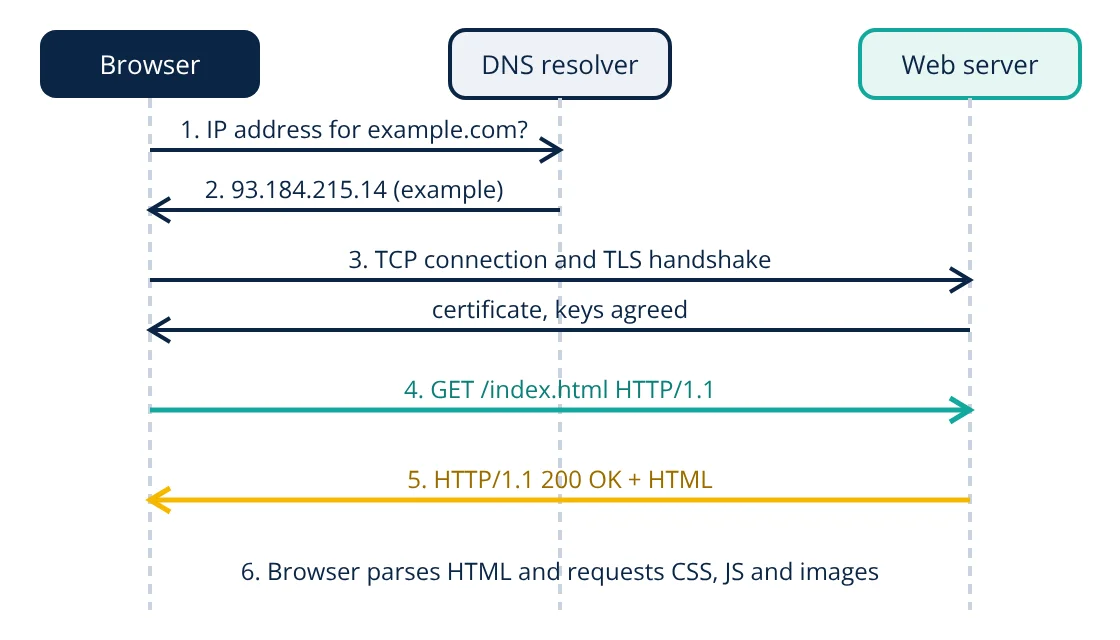
How HTTP works: a client, usually a browser, finds the server’s IP address through DNS, opens a connection (TCP, secured with TLS for HTTPS) and sends an HTTP request containing a method, a path and headers. The server processes it and returns an HTTP response with a status code, headers and usually a body such as an HTML page or JSON data. HTTP is stateless, so each request carries everything the server needs.
Every time you open a web page, submit a form or an app fetches data, the Hypertext Transfer Protocol (HTTP) carries the conversation between client and server. Understanding how HTTP works helps developers build faster sites, design good APIs and debug problems with the browser’s network tools.
Step by step: what happens when you open a URL
- URL parsing: the browser splits the URL into scheme (https), host (example.com), port (443 by default for HTTPS) and path (/index.html).
- DNS lookup: the browser asks a DNS resolver for the server’s IP address, unless it is cached.
- Connection: the browser opens a TCP connection to that address (HTTP/3 uses QUIC over UDP instead).
- TLS handshake (HTTPS): client and server agree on encryption keys, and the server proves its identity with a certificate signed by a trusted authority.
- Request: the browser sends an HTTP request.
- Processing: the server, or an application behind it, builds a response, perhaps by querying a database.
- Response: the server sends status, headers and body.
- Rendering: the browser parses the HTML, requests linked resources (stylesheets, scripts, images) and draws the page. Connections are reused for these follow-up requests.
Structure of an HTTP request
GET /products?id=42 HTTP/1.1
Host: shop.example.com
User-Agent: Mozilla/5.0
Accept: text/html
Accept-Language: en-IN
Cookie: session=abc123- Request line: method, target path with optional query string, and protocol version.
- Headers: name and value pairs giving metadata: the host, accepted formats, language, authentication, cookies and caching information.
- Blank line, then an optional body, used mainly with POST, PUT and PATCH to send form data or JSON.
Common methods
| Method | Purpose | Safe | Idempotent |
|---|---|---|---|
| GET | Retrieve a resource | Yes | Yes |
| HEAD | Like GET but headers only | Yes | Yes |
| POST | Submit data, create or process | No | No |
| PUT | Replace a resource | No | Yes |
| PATCH | Partially modify a resource | No | Not necessarily |
| DELETE | Remove a resource | No | Yes |
| OPTIONS | Ask which methods are allowed | Yes | Yes |
Safe means the request should not change server state. Idempotent means repeating it has the same effect as doing it once, which matters when a client retries after a network error. These properties are the basis of good REST API design.
Structure of an HTTP response
HTTP/1.1 200 OK
Content-Type: text/html; charset=utf-8
Content-Length: 5120
Cache-Control: max-age=3600
Set-Cookie: session=abc123; Secure; HttpOnly

<!doctype html>
<html> ... </html>
The status line gives the version, a three digit status code and a reason phrase. Headers describe the body (type, length, encoding), caching rules and cookies. The body carries the content.
Status code classes
| Class | Meaning | Common examples |
|---|---|---|
| 1xx | Informational | 100 Continue, 101 Switching Protocols |
| 2xx | Success | 200 OK, 201 Created, 204 No Content |
| 3xx | Redirection | 301 Moved Permanently, 302 Found, 304 Not Modified |
| 4xx | Client error | 400 Bad Request, 401 Unauthorized, 403 Forbidden, 404 Not Found, 429 Too Many Requests |
| 5xx | Server error | 500 Internal Server Error, 502 Bad Gateway, 503 Service Unavailable |
Statelessness, cookies and sessions
HTTP does not remember earlier requests. To keep a user logged in, the server sends a cookie with Set-Cookie; the browser returns it in later requests to the same site, and the server looks up the session. APIs more often use tokens in the Authorization header. Cookies should be marked Secure (HTTPS only), HttpOnly (not readable by scripts) and given a suitable SameSite setting.
Caching
Caching avoids sending the same data repeatedly. Cache-Control tells browsers and intermediate caches how long a response stays fresh. ETag and Last-Modified let the browser ask “has this changed?”; if not, the server replies 304 Not Modified with no body. Content delivery networks (CDNs) cache responses close to users, cutting latency.
HTTP versions
- HTTP/1.1: text based, persistent connections; browsers open several connections to load resources in parallel.
- HTTP/2: binary framing, header compression and multiplexing of many requests on one connection.
- HTTP/3: the same semantics over QUIC (UDP), with faster connection setup and better behaviour on lossy mobile networks.
The meaning of methods, headers and status codes is the same across all versions and is defined in RFC 9110.
HTTP security headers
Servers can instruct browsers to apply extra protections through response headers:
- Strict-Transport-Security (HSTS): tells the browser to use HTTPS only for the site, preventing downgrade to plain HTTP.
- Content-Security-Policy (CSP): limits where scripts, styles and images may load from, reducing cross-site scripting risk.
- X-Content-Type-Options: nosniff: stops the browser guessing a different content type than the one declared.
- Referrer-Policy: controls how much of the previous page address is sent to other sites.
- CORS headers such as Access-Control-Allow-Origin: allow or block web pages from other origins calling an API.
These headers cost nothing to send and close many common attack routes, so they should be part of every production web server configuration.
Browser developer tools show every request a page makes, with timings for DNS, connection, TLS, waiting and download, which makes these steps visible in practice.
Why knowing how HTTP works matters
Knowing how HTTP works helps you choose correct status codes and methods when building APIs, set caching headers to make pages fast, keep sessions secure, and read the browser’s network panel when something fails. On the server, each request is typically handled by a pool of processes or threads, and responses often come from a well designed, normalized database. Automated integration tests can call endpoints and check status codes and bodies before each release.
Frequently asked questions
What is the difference between HTTP and HTTPS?
HTTPS is HTTP sent over a TLS encrypted connection. TLS encrypts the traffic, protects it from tampering and lets the browser verify the server's identity with a certificate. The HTTP messages themselves are the same.
Why is HTTP called stateless?
Each request is independent: the server does not automatically remember previous requests from the same client. Applications add state on top, for example with cookies that carry a session identifier or with tokens sent in headers.
What changed in HTTP/2 and HTTP/3?
HTTP/2 kept the same methods, headers and status codes but sends them as binary frames and multiplexes many requests over one connection. HTTP/3 runs the same semantics over QUIC, a transport built on UDP that reduces connection setup time and avoids head-of-line blocking at the transport layer.
References
- RFC 9110, HTTP Semantics, IETF, 2022
- RFC 9112, HTTP/1.1, IETF, 2022
- RFC 9113, HTTP/2, and RFC 9114, HTTP/3, IETF, 2022
- RFC 8446, The Transport Layer Security (TLS) Protocol Version 1.3, IETF, 2018
- MDN Web Docs, An overview of HTTP, Mozilla
Get one engineering email a week
New articles, worked examples and study notes every week. Free, no spam, unsubscribe any time.