Types of Software Testing: Unit, Integration and System
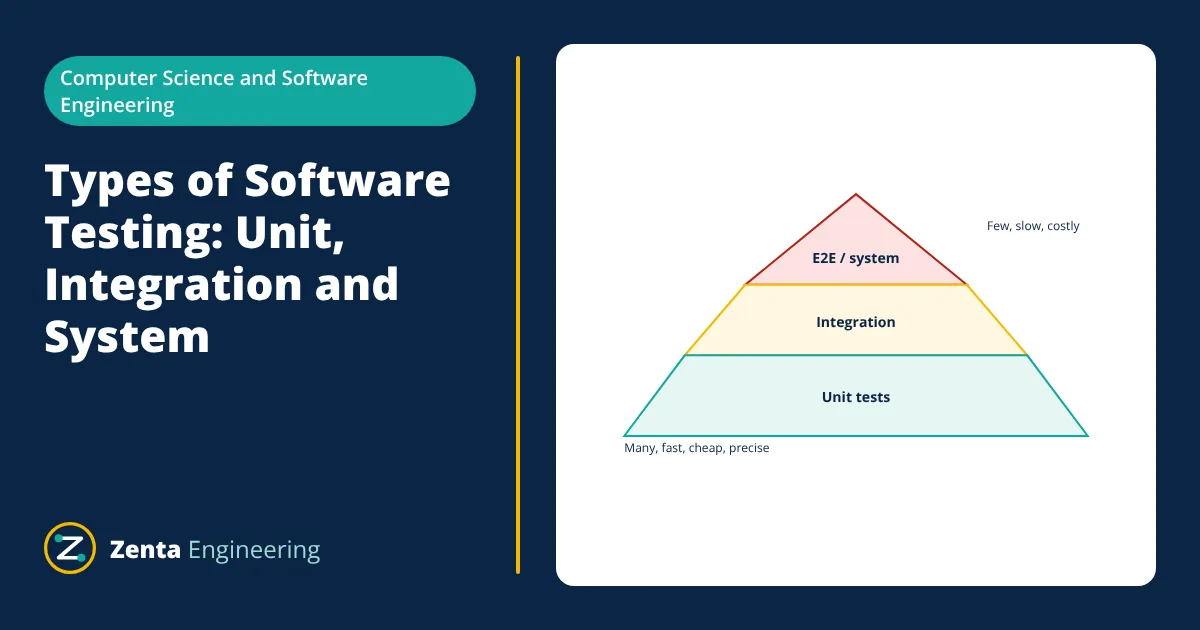
The main types of software testing by level are unit testing (single functions or classes), integration testing (components working together), system testing (the complete application against its requirements) and acceptance testing (users or customers confirm it meets their needs). Tests are also grouped as functional (does it do the right thing) or non-functional (performance, security, usability), and as black box or white box depending on whether testers use knowledge of the code.
Software testing checks that a program behaves as intended and finds defects before users do. No single kind of test can catch every problem, so teams combine several types at different levels. Knowing what each type covers, and how much of each to write, is the basis of an effective test strategy.
Types of software testing by level
Unit testing
A unit test exercises the smallest testable part of the code, usually a function, method or class, in isolation. Dependencies such as databases, networks or clocks are replaced with test doubles (mocks, stubs or fakes). Unit tests are written by developers, run in milliseconds and pinpoint failures precisely. Designing code with clear dependencies, as the SOLID principles recommend, makes unit testing much easier.
def discount(price, percent):
    if not 0 <= percent <= 100:
        raise ValueError("percent must be 0 to 100")
    return round(price * (100 - percent) / 100, 2)

def test_discount_normal():
    assert discount(200.0, 10) == 180.0

def test_discount_boundaries():
    assert discount(50.0, 0) == 50.0
    assert discount(50.0, 100) == 0.0
Integration testing
Integration tests check that units work together: the application with its real database, two services calling each other, or code calling an external payment API. They catch problems unit tests cannot, such as wrong SQL, mismatched data formats, configuration errors and incorrect assumptions about another component. Testing a REST API endpoint against a test database is a typical example.
System testing
System tests check the fully integrated application in an environment close to production, against its specified requirements. They are usually black box: testers drive the system through its user interface or public API without looking at the code. End-to-end (E2E) tests that simulate a user journey through the browser, such as “search, add to cart, pay”, belong here.
Acceptance testing
Acceptance testing decides whether the software is ready to be accepted by its users or customer. User acceptance testing (UAT) has real users try business scenarios; alpha and beta testing expose the product to internal and then external users; contractual or regulatory acceptance checks formal criteria.
The test pyramid
Mike Cohn’s test pyramid suggests a large number of fast unit tests at the base, fewer integration tests in the middle and a small number of slow, brittle end-to-end tests at the top. This keeps feedback fast and failures easy to diagnose while still checking the whole system. An “ice cream cone”, with mostly manual and E2E tests, is slow and costly to maintain.
Functional and non-functional testing
Functional testing checks what the system does against requirements: correct outputs, business rules, error handling. Techniques include equivalence partitioning (one test per class of similar inputs) and boundary value analysis (tests at and around limits, where bugs cluster).
Non-functional testing checks how well it does it:
- Performance testing: response time and throughput under expected load; load and stress testing push beyond normal levels; soak testing runs for long periods to reveal leaks.
- Security testing: vulnerability scanning, penetration testing, checks for injection and authentication flaws.
- Usability and accessibility testing: whether people, including those using assistive technologies, can use it effectively.
- Compatibility testing: different browsers, devices and operating systems.
- Reliability and recovery testing: behaviour when components fail.
Black box, white box and grey box
- Black box: tests are based on requirements and behaviour, without knowledge of the code.
- White box: tests are designed from the code structure, aiming at statement, branch or path coverage.
- Grey box: testers know some internals, such as the database schema, but test through external interfaces.
Other common test types
- Smoke testing: a quick check that the main functions work after a build or deployment.
- Sanity testing: a narrow check that a specific fix works.
- Regression testing: re-running tests after changes to catch side effects.
- Exploratory testing: skilled testers investigate the software freely, learning and designing tests as they go.
- Static testing: reviews and static analysis of code and documents without running them.
- Given
- The discount function above, which accepts a percentage from 0 to 100.
- Find
- A minimal set of test inputs using equivalence partitioning and boundary value analysis.
- Assumptions
- Percent is a number; values outside 0 to 100 must raise an error.
- Solution
- Partitions: below range (invalid), in range (valid), above range (invalid)
Boundaries: −1, 0, 100, 101
One typical valid value: 10 - Answer
- Test −1 and 101 (expect an error), 0 and 100 (edge results) and 10 (normal case): five tests cover every partition and boundary
- Limitations
- Add tests for non-numeric input and rounding if the function’s contract covers them.
Manual and automated testing
Manual testing is done by people following test cases or exploring freely. It suits usability checks, exploratory testing and features that change too often to automate. Automated testing uses scripts and frameworks such as pytest, JUnit, Jest, Selenium or Playwright to run tests repeatedly at no extra cost per run. Automation pays off for regression tests, which run on every change, and for tests that need precise timing or large data volumes. Most teams automate the bulk of unit, integration and regression tests and keep manual effort for exploratory and acceptance work.
Test cases and documentation
A test case records the preconditions, input data, steps and expected result, and links to the requirement it checks. Test plans describe scope, approach, environments, schedule and exit criteria for a release. Defect reports describe how to reproduce a failure, the expected and actual results, severity and priority. Standards such as ISO/IEC/IEEE 29119 and the ISTQB syllabus give common terms and templates, which help teams and clients communicate clearly about quality.
Measuring test effectiveness
Code coverage tools report which lines and branches the tests execute. High coverage does not guarantee good tests, but low coverage shows clearly which code is never checked. Mutation testing goes further by deliberately introducing small faults into the code and checking that at least one test fails for each; surviving mutants reveal weak assertions. Defect trends, escaped defects found in production and the time taken to run the suite are other useful measures of how well a testing process works.
Building a testing strategy
- Write unit tests alongside the code; consider test-driven development for complex logic.
- Add integration tests for every boundary: database, message queue, external API.
- Keep a small, stable set of end-to-end tests for critical user journeys.
- Run all automated tests in continuous integration on every change.
- Add performance and security testing before major releases and for high risk features.
- Track defects found in production and add tests that would have caught them.
Testing applies to every layer covered in this series, from database schemas designed by normalization to the HTTP behaviour of web applications and the efficiency of algorithms measured with Big O notation.
Frequently asked questions
What is the difference between unit testing and integration testing?
Unit tests check one small piece of code, such as a function or class, in isolation, usually with its dependencies replaced by fakes. Integration tests check that several components work together correctly, for example the application code with a real database or another service.
What is regression testing?
Re-running existing tests after a change to make sure previously working features still work. It is not a separate level but a purpose; automated unit, integration and system test suites are run as regression tests on every change in a continuous integration pipeline.
Can testing prove that software has no bugs?
No. Testing can show the presence of defects but not their absence, because it is impossible to test every input and path. Good testing reduces risk by focusing on the most important behaviours, likely errors and boundary conditions.
References
- ISO/IEC/IEEE 29119 Software and systems engineering, Software testing (series)
- ISTQB Certified Tester Foundation Level Syllabus, International Software Testing Qualifications Board
- G. J. Myers, C. Sandler and T. Badgett, The Art of Software Testing, 3rd ed., Wiley
- M. Cohn, Succeeding with Agile, Addison-Wesley (test automation pyramid)
Get one engineering email a week
New articles, worked examples and study notes every week. Free, no spam, unsubscribe any time.