REST API Basics: Methods, Status Codes and Design
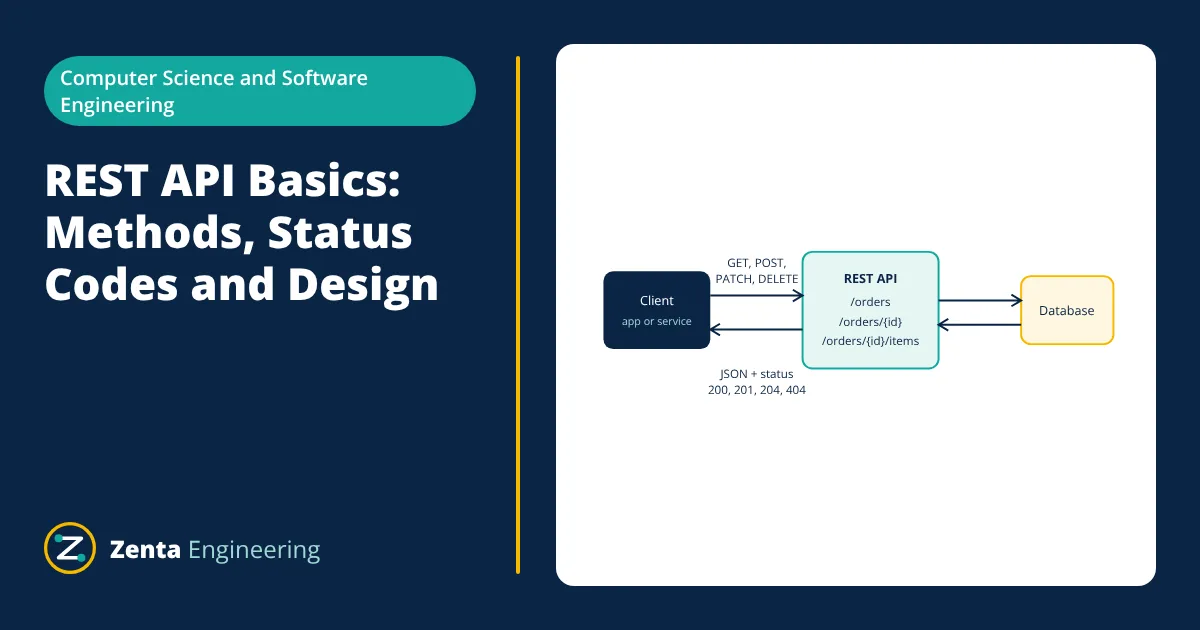
A REST API exposes an application’s data as resources identified by URLs, such as /users/42. Clients act on them with standard HTTP methods: GET to read, POST to create, PUT or PATCH to update and DELETE to remove. The server replies with an HTTP status code and usually a JSON body. Each request is stateless, carrying everything needed to process it, which makes REST APIs simple to scale and cache.
Mobile apps, web front ends, IoT devices and other services all talk to backends through APIs. REST (Representational State Transfer) is the most common style for web APIs because it builds directly on the way HTTP works. This article covers the basics a developer needs to use and design REST APIs well.
REST API constraints
Roy Fielding defined REST in his 2000 dissertation as a set of constraints:
- Client-server: user interface and data storage are separated, so each can evolve independently.
- Stateless: each request contains all the information the server needs; the server keeps no client session between requests.
- Cacheable: responses say whether they can be cached, reducing load and latency.
- Uniform interface: resources are identified by URIs and manipulated through representations using standard methods, with self-descriptive messages.
- Layered system: clients cannot tell whether they talk to the origin server or to proxies, gateways or load balancers in between.
- Code on demand (optional): servers may send executable code such as scripts.
Resources and URLs
Design URLs around nouns (resources), not verbs, and use plural collection names:
| Action | Method and URL |
|---|---|
| List orders | GET /orders |
| Get one order | GET /orders/1001 |
| Create an order | POST /orders |
| Replace an order | PUT /orders/1001 |
| Update some fields | PATCH /orders/1001 |
| Delete an order | DELETE /orders/1001 |
| List items of an order | GET /orders/1001/items |
Use query parameters for filtering, sorting and paging: GET /orders?status=shipped&sort=-date&page=2.
Representations: JSON
Most REST APIs exchange JSON. A request to create an order might send:
{
  "customerId": 57,
  "items": [{ "sku": "PT-100", "qty": 2 }],
  "shipTo": "Pune"
}
and the server replies with 201 Created, a Location header pointing to /orders/1001 and the created order in the body. Use consistent naming (camelCase or snake_case, not both), ISO 8601 dates and explicit units.
Status codes to use
| Situation | Status code |
|---|---|
| Successful read or update with a body | 200 OK |
| Resource created | 201 Created (plus Location header) |
| Success with no body, such as a delete | 204 No Content |
| Malformed request or invalid fields | 400 Bad Request |
| Missing or invalid authentication | 401 Unauthorized |
| Authenticated but not allowed | 403 Forbidden |
| Resource does not exist | 404 Not Found |
| Conflict, such as a duplicate | 409 Conflict |
| Validation failed on a well formed request | 422 Unprocessable Content |
| Rate limit exceeded | 429 Too Many Requests |
| Unexpected server failure | 500 Internal Server Error |
Return a consistent error body, for example a code, a human readable message and the field that failed, so clients can handle errors predictably.
- Given
- A mobile app retries a request after a network timeout and is not sure whether the first attempt reached the server.
- Find
- Which operations are safe to retry automatically.
- Assumptions
- The API follows HTTP semantics for each method.
- Solution
- GET, PUT and DELETE are idempotent: repeating them leaves the same final state
POST is not idempotent: a retry could create a second order
Many APIs accept an Idempotency-Key header on POST so the server can detect and ignore duplicates - Answer
- Retry GET, PUT and DELETE freely; retry POST only with an idempotency key or after checking whether the first request succeeded
- Limitations
- Idempotency depends on the server implementing methods correctly; a GET that changes data breaks these guarantees.
Design best practices
- Versioning: include a version in the path (/v1/orders) or a header, and avoid breaking changes within a version.
- Pagination: never return unbounded lists; use page and size or cursor based paging, and return links or a next cursor.
- Filtering and field selection: let clients ask only for what they need.
- Security: always use HTTPS; authenticate with tokens such as OAuth 2.0 bearer tokens; validate every input; apply rate limits; never trust client side checks alone.
- Documentation: describe endpoints with the OpenAPI specification so clients and tests can be generated.
- Statelessness: keep session state out of server memory so any instance can serve any request and the API scales horizontally behind a load balancer.
- Caching: use Cache-Control and ETag headers on read endpoints.
Testing and documenting a REST API
During development, tools such as curl, Postman or the browser’s developer console send requests and show the raw status, headers and body. An OpenAPI description lets teams generate interactive documentation, client libraries and contract tests from one source. Automated tests should check each endpoint for the success case, validation errors, missing authentication, missing resources and permission failures, comparing both the status code and the shape of the JSON. Monitoring in production then tracks error rates and response times per endpoint, so problems are found before users report them.
Rate limits, quotas and clear deprecation notices in responses help clients adapt when an API changes or is under heavy load. Publish a changelog so integrators know what changed and when.
REST and the backend
Behind the API, a backend application validates requests, applies business rules and reads or writes a database whose tables should be well designed; see database normalization. Clean code structure, such as the SOLID principles, keeps controllers, services and data access layers separate and testable. Every endpoint should be covered by integration tests that check status codes and response bodies.
Alternatives to REST include GraphQL, where clients specify exactly the fields they need in one query, and gRPC, which uses binary messages over HTTP/2 for fast service to service calls. REST remains the most common choice for public web APIs because it is simple, cache friendly and works with every HTTP tool.
Frequently asked questions
What is the difference between REST and HTTP?
HTTP is a protocol for sending requests and responses. REST is an architectural style, described by Roy Fielding in 2000, that sets constraints such as client-server separation, statelessness, cacheability and a uniform interface. Most REST APIs use HTTP, but using HTTP alone does not make an API RESTful.
Should I use PUT or PATCH to update a resource?
PUT replaces the whole resource with the representation sent and is idempotent. PATCH sends only the fields to change. Use PATCH for partial updates and PUT when the client sends the complete resource.
What is the difference between 401 and 403?
401 Unauthorized means the request lacks valid authentication, so the client should log in or send a valid token. 403 Forbidden means the server knows who the client is but that client is not allowed to perform the action.
References
- R. T. Fielding, Architectural Styles and the Design of Network-based Software Architectures, PhD dissertation, University of California, Irvine, 2000
- RFC 9110, HTTP Semantics, IETF, 2022
- RFC 8259, The JavaScript Object Notation (JSON) Data Interchange Format, IETF, 2017
- OpenAPI Specification, OpenAPI Initiative
Get one engineering email a week
New articles, worked examples and study notes every week. Free, no spam, unsubscribe any time.