Process vs Thread in Operating Systems
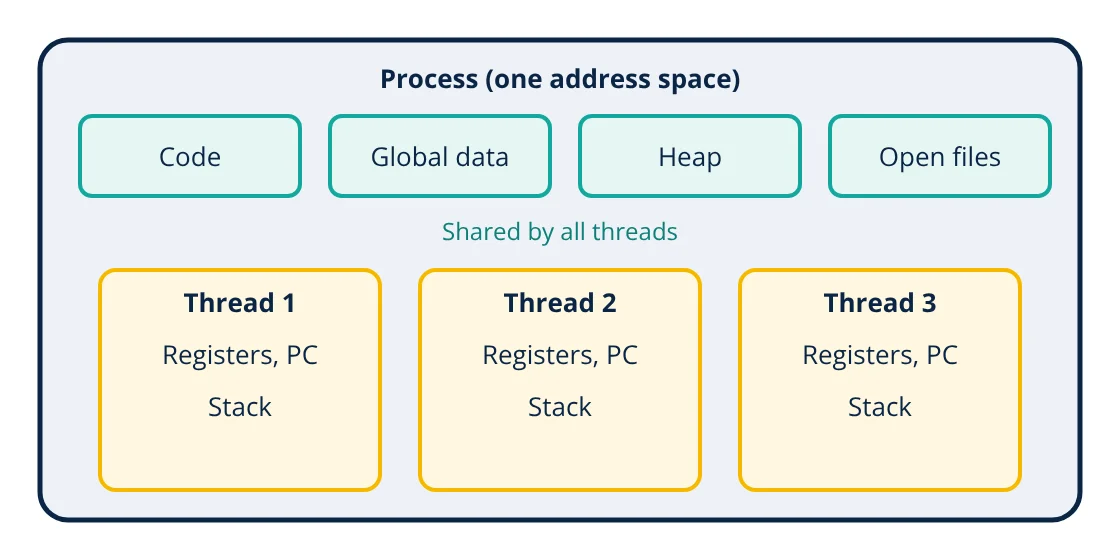
In process vs thread, a process is a running program with its own private memory (address space) and system resources such as open files. A thread is a path of execution inside a process; all threads of a process share its memory and resources, but each has its own stack, registers and program counter. Processes are isolated and safer; threads are lighter and communicate faster, but must coordinate access to shared data.
When you open a browser, edit a document and play music at the same time, the operating system is running many processes, and each of them may use several threads. Understanding the difference between processes and threads helps programmers write responsive, efficient and correct software, and is a staple of operating systems courses and interviews.
What is a process?
A process is an instance of a program in execution. The operating system gives each process:
- A private virtual address space containing its code (text), global data, heap for dynamic allocation and stack.
- Resources: open files, network sockets, handles, security credentials.
- A process control block (PCB) in the kernel holding its state (new, ready, running, waiting, terminated), priority, register values when not running, and memory management information.
- A unique process ID (PID).
Because address spaces are separate, one process cannot normally read or write another’s memory. They communicate through inter-process communication (IPC): pipes, sockets, message queues, shared memory segments or signals.
What is a thread?
A thread is the unit the CPU scheduler actually runs. Every process has at least one thread. Additional threads share the process’s code, data, heap and open files, but each thread has its own:
- Program counter (where it is executing)
- Registers
- Stack for local variables and function calls
- Thread ID and scheduling state
Process vs thread: key differences
| Feature | Process | Thread |
|---|---|---|
| Memory | Own private address space | Shares the process’s address space |
| Isolation | Strong; a crash usually affects only that process | Weak; a fault can bring down the whole process |
| Creation cost | Higher (new address space, page tables, resources) | Lower |
| Context switch | Slower; may change memory mappings and flush translation caches | Faster within the same process |
| Communication | IPC through the kernel or shared memory setup | Directly through shared variables |
| Synchronisation needs | Less, since data is separate | More: locks, semaphores, atomics |
| Example | Each browser tab process, each server worker process | Download, rendering and UI threads in one app |
Process states and scheduling
A process or thread moves between states during its life. It is new while being created, ready when it can run but is waiting for a CPU, running when on a core, waiting (blocked) while it waits for I/O or an event, and terminated when finished. The scheduler picks which ready thread runs next, using policies such as round robin time slices and priorities, so that interactive programs stay responsive while background work still makes progress. Ready queues are classic examples of linked data structures inside the kernel.
On Linux, threads and processes are both created with the clone system call, differing only in which resources are shared, which shows how closely related the two ideas are.
Context switching
To share the CPU, the operating system saves the state of the running thread and restores another, a context switch. Switching between threads of the same process only swaps registers, stack pointer and program counter. Switching between processes also changes the memory mappings, which can invalidate translation lookaside buffer entries and make caches less effective. That is why thread switches are generally cheaper, although both cost much more than ordinary instructions.
Concurrency problems with threads
Shared memory is fast but dangerous:
- Race conditions: results depend on timing of unsynchronised access to shared data.
- Deadlock: two threads each hold a lock the other needs and wait forever.
- Starvation: a thread never gets the resource it needs.
- Visibility issues: without proper synchronisation, one thread may not see another’s writes promptly.
Tools to manage them include mutexes (locks), semaphores, condition variables, atomic operations and designs that avoid sharing, such as message passing and immutable data.
- Given
- Two threads each run the statement counter = counter + 1 one million times on a shared counter that starts at 0, with no lock.
- Find
- The expected and possible final values.
- Assumptions
- The statement compiles to separate load, add and store steps; threads run truly in parallel on two cores.
- Solution
- Expected if updates never overlap: 2,000,000
If both threads load the same old value before either stores, one increment is lost. This can happen many times
With a mutex around the update, or an atomic increment, no update is lost - Answer
- Without synchronisation the result is often less than 2,000,000 and changes from run to run; with a lock or atomic it is always 2,000,000
- Limitations
- Some language runtimes, such as CPython with its global interpreter lock, change how often this appears, but correct code must not rely on that.
When to use processes or threads
Use multiple processes when:
- Isolation and fault tolerance matter (browsers isolate sites in separate processes for security and stability).
- Components are written in different languages or must run with different privileges.
- You need to use many cores from a runtime that limits thread parallelism.
Use multiple threads when:
- Tasks share a lot of data and need fast communication.
- A program must stay responsive, for example a user interface thread plus background worker threads.
- Many concurrent I/O operations must be handled, as in a web server answering HTTP requests or a REST API backend.
Modern systems often combine both: several worker processes, each with a pool of threads, or event loops with asynchronous I/O. Which approach performs best depends on the hardware, discussed in Von Neumann vs Harvard architecture, and on the algorithms used, measured with Big O notation. Small embedded systems based on a microcontroller often have no processes at all and use a real-time operating system with lightweight tasks instead.
Frequently asked questions
Can two threads run at exactly the same time?
Yes, on a multi-core processor threads of the same process can run truly in parallel on different cores. On a single core they take turns through time slicing, which gives the appearance of simultaneous execution, called concurrency.
Why does one crashing thread often kill the whole program?
Threads share the same address space. A thread that corrupts memory or triggers an unhandled fault such as a segmentation fault affects the whole process, and the operating system usually terminates the process with all its threads. Separate processes are isolated from each other.
What is a race condition?
A bug where the result depends on the unpredictable order in which threads access shared data. For example, two threads incrementing the same counter can both read the old value and both write back the same new value, losing an update. Locks, atomic operations and careful design prevent it.
References
- A. Silberschatz, P. B. Galvin and G. Gagne, Operating System Concepts, 10th ed., Wiley
- A. S. Tanenbaum and H. Bos, Modern Operating Systems, 4th ed., Pearson
- R. H. Arpaci-Dusseau and A. C. Arpaci-Dusseau, Operating Systems: Three Easy Pieces, Arpaci-Dusseau Books
Get one engineering email a week
New articles, worked examples and study notes every week. Free, no spam, unsubscribe any time.