Image Preprocessing Techniques for Computer Vision
Image preprocessing is the set of operations that turn raw images into consistent model inputs for computer vision. Typical steps are resizing and cropping, colour conversion, scaling and normalizing pixel values, noise filtering, contrast adjustment and, during training only, random data augmentation, before the image becomes a tensor for the model.
Image preprocessing decides what a computer vision model actually sees. Cameras deliver images of different sizes, lighting, colour orders and noise levels, while a model expects one fixed input format. Good preprocessing makes training faster and more stable, and a mismatch between training and deployment preprocessing is one of the most common reasons a model that scored well in testing fails in the field.
Why image preprocessing matters
A digital image is a grid of pixels. A colour image stored as 8 bit integers holds three values per pixel, for red, green and blue, each from 0 to 255. A model such as a convolutional neural network needs every input to have the same height, width, channel count, channel order and value range. Preprocessing provides that consistency.
It also serves three other purposes described by Gonzalez and Woods and by Szeliski:
- Enhancement: improve contrast or reduce noise so useful detail is easier to detect.
- Standardization: remove differences that do not matter for the task, such as overall brightness or image size.
- Regularization: augmentation creates varied copies of training images, which helps the model generalize and reduces overfitting.
A typical image preprocessing pipeline
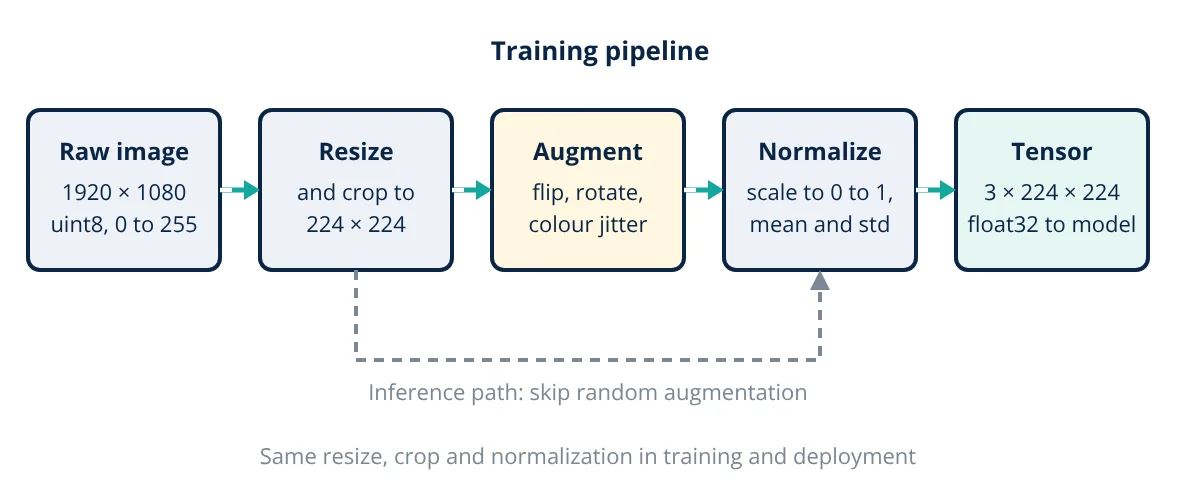
The exact order varies by library, but the stages above appear in almost every deep learning project. In torchvision, for example, a training pipeline often uses a random resized crop, a random horizontal flip, conversion to a tensor and normalization, while the evaluation pipeline uses a fixed resize and a centre crop.
Resizing, cropping and interpolation
Models need a fixed input size, commonly 224 × 224 for ImageNet classifiers. Two ways to get there:
- Direct resize to the target size. Simple, but if the aspect ratio changes, objects are stretched.
- Resize the shorter side, then crop. The torchvision ImageNet models, for example, resize the shorter side to 256 pixels and take a 224 × 224 centre crop for evaluation. This keeps the aspect ratio but may cut off edges of the scene.
- Letterbox (pad). Resize to fit inside the target and pad the remainder, common in object detection so that no part of the image is lost.
Resizing needs interpolation to estimate new pixel values. Nearest neighbour is fastest but blocky, bilinear and bicubic give smoother results, and the OpenCV documentation recommends area interpolation (INTER_AREA) for shrinking images because it reduces aliasing. Shrinking without proper filtering can produce the aliasing patterns explained by the sampling theorem. Label masks in segmentation must use nearest neighbour so class numbers are not blended.
Colour conversion and grayscale
Channel order is a classic trap: OpenCV loads images in BGR order, while most deep learning libraries and pretrained weights assume RGB. Feeding BGR images to an RGB model silently swaps red and blue and lowers accuracy.
When colour does not help the task, such as some document or surface inspection jobs, converting to grayscale cuts the data to one channel. OpenCV uses the luma weights of ITU-R BT.601:
Green gets the largest weight because human vision is most sensitive to it. Other colour spaces are useful too: HSV separates hue from brightness, which helps colour based segmentation under changing light.
Normalization and standardization
Raw 8 bit pixels range from 0 to 255. Neural networks train more reliably when inputs are small and centred near zero, so pixels are first scaled to 0 to 1 by dividing by 255, then often standardized per channel:
For pretrained ImageNet models, the torchvision documentation gives channel means of 0.485, 0.456 and 0.406 and standard deviations of 0.229, 0.224 and 0.225 for R, G and B. For a model trained from scratch, the mean and standard deviation should be computed on the training set only, never on validation or test data, to avoid information leaking between them.
Finally the image is rearranged from height, width, channels (HWC, as stored by OpenCV and image files) to channels, height, width (CHW, as PyTorch expects) and stacked into a batch.
Noise reduction and contrast enhancement
Classical filters from Gonzalez and Woods are still widely used, especially in industrial machine vision:
- Gaussian blur: a weighted average that smooths sensor noise; also used before downsampling.
- Median filter: replaces each pixel with the median of its neighbours, very effective against salt and pepper noise while keeping edges sharper than averaging.
- Histogram equalization: spreads intensity values over the full range to raise contrast in dull images.
- CLAHE (contrast limited adaptive histogram equalization): equalizes small tiles separately with a clip limit, avoiding over amplified noise; available in OpenCV.
- Thresholding and morphology: convert to binary and clean up shapes for simple measurement tasks.
For deep learning, heavy filtering is often unnecessary, because the network learns its own filters. Apply it only if it is also applied identically at inference.
Data augmentation
Augmentation applies random, label preserving changes to training images each epoch, so the model rarely sees the exact same picture twice:
- Geometric: horizontal flips, small rotations, random crops, scaling and translation.
- Photometric: brightness, contrast, saturation and hue jitter, blur and added noise.
- Advanced: random erasing, and mixing methods that blend two images and their labels.
Each change must keep the label valid. A horizontal flip is fine for cats but wrong for text recognition, and in detection or segmentation the boxes and masks must be transformed together with the image.
- Given
- One pixel of an RGB photo has values R = 200, G = 120, B = 50. The image will be fed to a pretrained ImageNet model at 224 × 224 in float32, in batches of 32.
- Find
- (a) The normalized value of each channel. (b) The grayscale value of the pixel by BT.601. (c) The memory for one input batch.
- Assumptions
- torchvision ImageNet means 0.485, 0.456, 0.406 and standard deviations 0.229, 0.224, 0.225; 4 bytes per float32 value; channel order is RGB.
- Solution
- (a) R: 200 ÷ 255 = 0.7843; (0.7843 − 0.485) ÷ 0.229 = 1.307
G: 120 ÷ 255 = 0.4706; (0.4706 − 0.456) ÷ 0.224 = 0.065
B: 50 ÷ 255 = 0.1961; (0.1961 − 0.406) ÷ 0.225 = −0.933
(b) Y = 0.299 × 200 + 0.587 × 120 + 0.114 × 50 = 59.8 + 70.44 + 5.7 = 135.94, about 136
(c) Values per image = 3 × 224 × 224 = 150 528; bytes = 150 528 × 4 = 602 112; batch = 32 × 602 112 = 19 267 584 bytes - Answer
- Normalized RGB about (1.307, 0.065, −0.933); grayscale about 136; one batch about 19.3 MB
- Limitations
- If the image had been loaded as BGR and not converted, the red and blue values would be swapped and the normalized inputs would be wrong. Memory for activations inside the network is much larger than the input batch.
Key formulas for image preprocessing
| Quantity | Formula | Symbols and units |
|---|---|---|
| Scaling | x_s = x ÷ 255 | x = 8 bit pixel value, 0 to 255 |
| Standardization | x_norm = (x_s − μ) ÷ σ | μ, σ = channel mean and standard deviation of scaled pixels |
| Min max normalization | x’ = (x − x_min) ÷ (x_max − x_min) | Maps values to 0 to 1 |
| Grayscale (BT.601) | Y = 0.299R + 0.587G + 0.114B | R, G, B = channel values |
| Histogram equalization | s_k = (L − 1) × Σ p_r(r_j), j = 0 to k | L = number of grey levels, p_r = normalized histogram |
| Input tensor memory | Bytes = N × C × H × W × b | N batch size, C channels, H × W pixels, b bytes per value (4 for float32) |
Common image preprocessing mistakes
- Training and inference mismatch: different resize method, crop, channel order or normalization in deployment than in training.
- Normalizing twice or forgetting to divide by 255, so inputs are far outside the expected range.
- Statistics from all data: computing mean and standard deviation over test images leaks information.
- Augmenting validation data, which makes accuracy noisy and not repeatable.
- Label breaking augmentation, such as flipping digits or rotating images where orientation is the label.
Image preprocessing is one stage of the wider data science workflow, and it should be versioned and tested like any other code. The choice of task, explained in classification vs detection vs segmentation, also decides how labels must be transformed.
Image preprocessing interview and viva questions
- Why are pixel values normalized before training a neural network? Small, zero centred inputs keep activations and gradients in a good range, so training converges faster and more stably.
- What is the difference between BGR and RGB, and why does it matter? They store the same channels in opposite order; OpenCV loads BGR, while most pretrained models expect RGB, so a missing conversion swaps red and blue.
- Which interpolation should be used to shrink an image? The OpenCV documentation recommends area interpolation for shrinking because it reduces aliasing; label masks must use nearest neighbour.
- Why is augmentation applied only to training data? Random changes regularize training, but evaluation needs fixed, repeatable inputs so that measured accuracy is meaningful.
- When is a median filter preferred over a Gaussian filter? For salt and pepper noise, because the median removes isolated extreme pixels while keeping edges sharper.
Frequently asked questions
Is image preprocessing still needed with deep learning?
Yes. A neural network does not need hand made features, but it still expects inputs of a fixed size, a fixed channel order and a known value range. Resizing, normalization and the same colour handling used during training are required, and augmentation is one of the most effective ways to reduce overfitting on small datasets.
Should I normalize images to 0 to 1 or use mean and standard deviation?
Use whatever the model was trained with. Pretrained torchvision ImageNet models expect pixels scaled to 0 to 1 and then standardized with the ImageNet channel means and standard deviations. A model trained from scratch works with either choice, as long as training and inference use exactly the same step.
Should data augmentation be applied to the test set?
No, not the random kind. Validation and test images get only the deterministic steps, such as resize, centre crop and normalization, so that measured accuracy is repeatable. Some systems use test time augmentation, averaging predictions over a few flipped or cropped copies, but that is a deliberate inference technique, not part of normal preprocessing.
References
- R. C. Gonzalez and R. E. Woods, Digital Image Processing, 4th ed., Pearson, 2018
- R. Szeliski, Computer Vision: Algorithms and Applications, 2nd ed., Springer, 2022
- OpenCV documentation, Image Processing module (imgproc): Geometric Image Transformations, Color Space Conversions, Image Filtering, Histograms
- PyTorch torchvision documentation, Transforming and augmenting images, and Models and pre-trained weights
- ITU-R Recommendation BT.601, Studio encoding parameters of digital television for standard 4:3 and wide screen 16:9 aspect ratios
Get one engineering email a week
New articles, worked examples and study notes every week. Free, no spam, unsubscribe any time.