Wi-Fi Standards and Bands Explained: Wi-Fi 4 to 7
Wi-Fi standards and bands define how wireless LANs work. Standards come from the IEEE 802.11 family and are marketed by the Wi-Fi Alliance with generation names: Wi-Fi 4 (802.11n), Wi-Fi 5 (802.11ac), Wi-Fi 6/6E (802.11ax) and Wi-Fi 7 (802.11be). They operate in three main bands: 2.4 GHz (long range, crowded), 5 GHz (faster, more channels) and 6 GHz (newest, widest channels, least interference). Each generation adds wider channels, more MIMO streams and better modulation for higher speed and efficiency.
Wi-Fi connects billions of laptops, phones, cameras, tablets and machines. Choosing access points, planning channels and troubleshooting slow connections all depend on understanding the standards and the radio bands they use.
Wi-Fi standards and bands by generation
| Generation | IEEE standard | Year | Bands | Max channel width | Max PHY rate |
|---|---|---|---|---|---|
| (legacy) | 802.11b | 1999 | 2.4 GHz | 20 MHz | 11 Mbit/s |
| (legacy) | 802.11a | 1999 | 5 GHz | 20 MHz | 54 Mbit/s |
| (legacy) | 802.11g | 2003 | 2.4 GHz | 20 MHz | 54 Mbit/s |
| Wi-Fi 4 | 802.11n | 2009 | 2.4, 5 GHz | 40 MHz | 600 Mbit/s |
| Wi-Fi 5 | 802.11ac | 2013 | 5 GHz | 160 MHz | about 6.9 Gbit/s |
| Wi-Fi 6 / 6E | 802.11ax | 2019 / 2020 | 2.4, 5 (and 6) GHz | 160 MHz | about 9.6 Gbit/s |
| Wi-Fi 7 | 802.11be | 2024 | 2.4, 5, 6 GHz | 320 MHz | about 46 Gbit/s |
Maximum PHY rates are theoretical totals across all streams. Real throughput for one device is usually a fraction of this, because of protocol overhead, shared airtime and the device’s own antenna count.
Key technologies
- OFDM: the signal is split into many narrow subcarriers, which resists multipath reflections. Wi-Fi 6 adds OFDMA, which divides subcarriers among several users at once, improving efficiency in busy networks.
- QAM modulation: more bits per symbol at higher signal quality: 64-QAM (Wi-Fi 4), 256-QAM (Wi-Fi 5), 1024-QAM (Wi-Fi 6) and 4096-QAM (Wi-Fi 7). See modulation techniques.
- MIMO: multiple antennas send several spatial streams at once. MU-MIMO serves several clients simultaneously.
- Beamforming: focuses signal towards a client to improve range and rate.
- Target wake time (Wi-Fi 6): schedules when devices wake, saving battery for IoT devices.
- Multi-link operation (Wi-Fi 7): a device uses several bands at once for higher speed and reliability.
The frequency bands
2.4 GHz
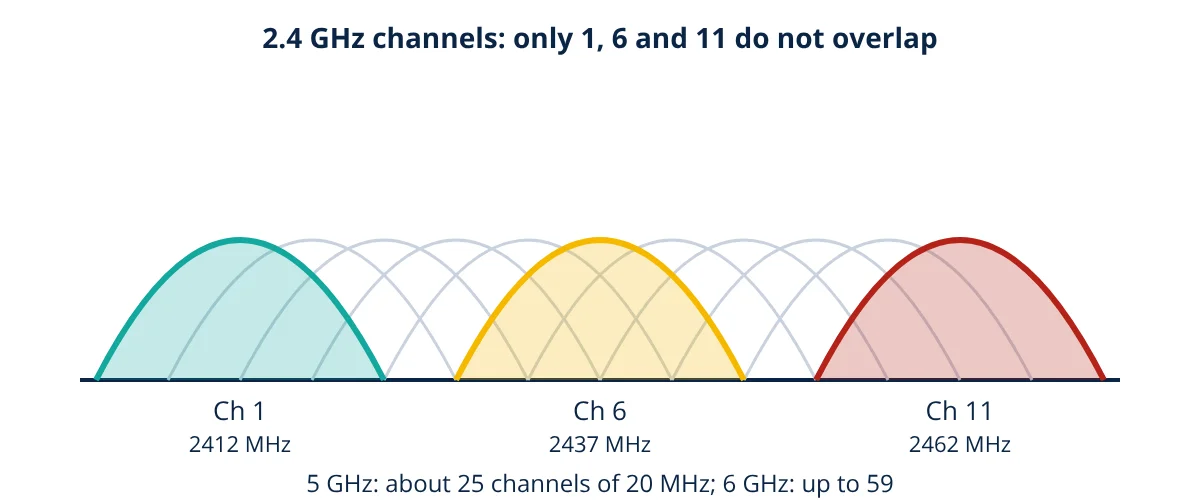
The 2.4 GHz ISM band (2.400 to 2.4835 GHz) has channels numbered 1 to 13 (1 to 11 in the USA) spaced 5 MHz apart, but each Wi-Fi channel is about 20 MHz wide, so neighbouring channels overlap. Only three non-overlapping channels exist: 1, 6 and 11. The band is shared with Bluetooth, microwave ovens and many other devices. Longer wavelength gives better range and wall penetration.
5 GHz
The 5 GHz band offers about 25 non-overlapping 20 MHz channels, depending on the country, which can be bonded into 40, 80 or 160 MHz channels. Some channels require DFS (dynamic frequency selection), which makes access points move away if radar is detected. Range is shorter than 2.4 GHz, but capacity is far higher.
6 GHz
Opened from 2020 in many countries (Wi-Fi 6E and Wi-Fi 7), the 6 GHz band adds up to 1200 MHz of clean spectrum (5.925 to 7.125 GHz where fully allowed), enough for seven 160 MHz or three 320 MHz channels. Only new devices can use it, so there is no interference from legacy equipment. Range is the shortest of the three bands.
Range and frequency
Free space loss increases with frequency. Every doubling of frequency adds about 6 dB of loss at the same distance:
- Given
- An access point covers a warehouse aisle at 2.4 GHz. The owner wants to move clients to 5.5 GHz.
- Find
- The extra free space loss and the approximate change in range for the same received signal.
- Assumptions
- Free space conditions, same antenna gain and transmit power.
- Solution
- ΔL = 20 log₁₀(5.5 ÷ 2.4) = 20 log₁₀(2.29) = 7.2 dB
In free space, range scales with 1 ÷ f, so range ratio = 2.4 ÷ 5.5 = 0.44 - Answer
- About 7.2 dB more loss; free space range drops to roughly 44% of the 2.4 GHz range, so more access points are needed
- Limitations
- Walls, racking and stock absorb 5 GHz more than 2.4 GHz, so the real difference can be larger; a site survey confirms coverage.
Wi-Fi security
Wi-Fi security has evolved alongside the standards. WEP, the original scheme, is broken and must never be used. WPA2 with AES encryption was the long standing baseline, and WPA3, required for Wi-Fi 6E and Wi-Fi 7 certification in the 6 GHz band, replaces the pre-shared key handshake with SAE, which resists offline password guessing. Enterprise networks use 802.1X authentication with a RADIUS server, so each user or device has its own credentials and can be revoked individually. Protected management frames stop attackers from forcing clients off the network.
Backward compatibility
Newer access points still serve older clients, but a slow legacy device takes more airtime for the same data and lowers performance for everyone on that channel. Where possible, disable the oldest data rates and move legacy devices to their own SSID or band.
Planning a Wi-Fi network
- Design for capacity, not only coverage: count devices and their traffic, and add access points accordingly.
- Prefer 5 and 6 GHz for performance; use 20 or 40 MHz channels in dense areas to allow more channel reuse.
- Use channels 1, 6 and 11 only in 2.4 GHz and lower its power to reduce co-channel interference.
- Do a site survey with measurement tools before and after installation.
- Secure the network with WPA3, separate SSIDs and VLANs for guests, staff and machines, and a firewall between zones.
- In plants, choose industrial access points with suitable enclosures, and consider reflections from metal structures.
Wi-Fi works at the link layer of the OSI model, and access points usually connect to a wired switch. For wide area or high mobility needs, 5G is the complementary wireless technology.
Frequently asked questions
Which Wi-Fi band is better, 2.4 GHz or 5 GHz?
5 GHz offers many more non-overlapping channels, wider channels and much less interference, so it gives higher speeds. 2.4 GHz travels further and penetrates walls better but is crowded and slower. Most networks use 5 GHz (and 6 GHz where available) for performance and keep 2.4 GHz for range and older or low power devices.
Why are only channels 1, 6 and 11 recommended in 2.4 GHz?
Each 2.4 GHz Wi-Fi channel is about 20 MHz wide, but channel numbers are only 5 MHz apart, so neighbouring channels overlap. Channels 1, 6 and 11 are spaced 25 MHz apart and do not overlap, so access points set to them do not interfere with each other.
Is Wi-Fi suitable for industrial control?
Wi-Fi is widely used for HMIs on tablets, mobile robots, barcode scanners and monitoring data. For safety or fast closed loop control, its variable latency and susceptibility to interference need careful design, industrial access points, site surveys and redundant links, or a wired or private 5G alternative.
References
- IEEE 802.11-2020, Wireless LAN Medium Access Control (MAC) and Physical Layer (PHY) Specifications
- IEEE 802.11ax-2021, Enhancements for High Efficiency WLAN
- Wi-Fi Alliance, Wi-Fi 6, Wi-Fi 6E and Wi-Fi 7 technology overviews
- M. Gast, 802.11 Wireless Networks: The Definitive Guide, 2nd ed., O'Reilly
Get one engineering email a week
New articles, worked examples and study notes every week. Free, no spam, unsubscribe any time.